
Recurpay
Connect Recurpay to Churn Solution.
On this page
- How to connect Recurpay and Churn Solution
- Step 1: Provide your Shopify Admin URL
- Step 2: Preparing your Recurpay app
- Step 3: Install the Churn Solution app in your Shopify store
- Step 4: Enable the integration in Recurpay
- Cancellation Flows on Recurpay
- Integration steps
- Offers available on Recurpay
- How Recurpay is used with Churn Solution
- Recommended discount setup
- Audience segmentation
- Payment Recovery on Recurpay
- Reactivation Campaigns on Recurpay
Personalized exit surveys and save offers shown the moment a customer clicks cancel.
Dunning emails, smart retries and a payment wall that recover failed payments automatically.
Automated win-back emails sent to cancelled customers, based on the reason they left.
How to connect Recurpay and Churn Solution
Once you sign up for a Churn Solution account, link your company's Recurpay account in four steps.
Step 1: Provide your Shopify Admin URL
To begin the integration, you'll need to provide your Shopify Admin URL, found in your Shopify admin account. Format: https://admin.shopify.com/store/<your Merchant Account ID>.
Step 2: Preparing your Recurpay app
Once you enter your Shopify Admin URL, Churn Solution starts preparing the app for you. You'll be notified by email as soon as it's ready.
Step 3: Install the Churn Solution app in your Shopify store
Once the app is prepared, install the Churn Solution app into your Shopify store so it can manage products and coupons.
Step 4: Enable the integration in Recurpay
Go to the Recurpay integration settings and search for Churn Solution to activate it. Once your account is successfully connected, you'll see a label indicating that the connection was successful, and your data begins importing into Churn Solution.
Cancellation Flows on Recurpay Supported
Built for Shopify stores running Recurpay subscriptions — a no-code integration in two steps: connect your Recurpay account, then build your flows. Churn Solution is the only retention tool with a Recurpay integration. Save offers are discounts applied through the Churn Solution Shopify app; segment flows by product to target specific lines.
Integration steps
No code required. Recurpay is a no-code integration: there is no SDK to install and no script to embed. Connect your account, build your flows, and Churn Solution shows them to your Shopify customers.
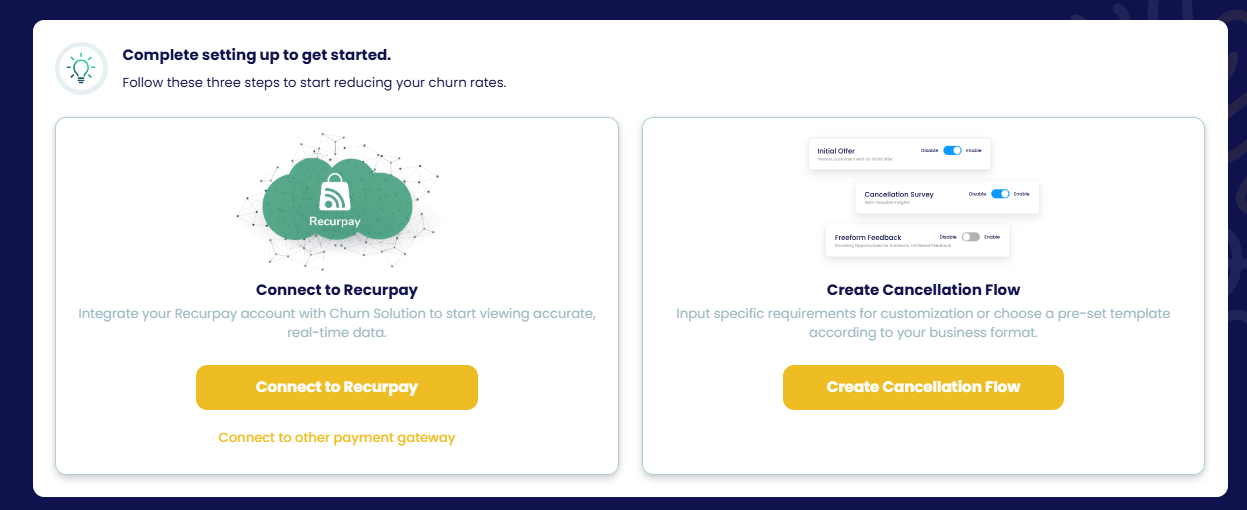
- Connect to Recurpay
Integrate your Recurpay account with Churn Solution to start viewing accurate, real-time data. Follow How to connect Recurpay and Churn Solution above.
- Create the cancellation flow
Open Cancellation Flows and input your requirements or choose a pre-set template. You can create multiple flows and segment them by product — see the Flow builder page.
Offers available on Recurpay
- ✓ Pause subscription
- ✓ Apply discount
- ✓ Switch plan
- ✓ Switch plan with offer
- ✓ Extend free trial
- ✓ Contact support (email / WhatsApp)
- ✓ Send to a page
Since customers will see a message like "Claim your X% discount for X months", it is better to use discounts that apply to all products in your Shopify store. If you want to target specific products, set up a cancellation flow based on the products so the discount applies only to the products the customer selects.
How Recurpay is used with Churn Solution
Recommended discount setup
- Apply discounts to all products
Use store-wide discounts so a claimed offer applies to every item in the customer's order.
- Target specific products with a segmented flow
Build a product-based cancellation flow so the discount applies only to the products the customer selects.
Audience segmentation
Churn Solution imports subscriptions and products from Recurpay to build audiences. Available attributes:
Payment Recovery on Recurpay Not available
Payment Recovery is not available on Recurpay yet. If you need it for your store, contact the team.
Contact the teamReactivation Campaigns on Recurpay Not available
Reactivation Campaigns are not available on Recurpay yet. If you need them for your store, contact the team.
Contact the team