
Revolut
Integrate Revolut with Churn Solution.
On this page
Personalized exit surveys and save offers shown the moment a customer clicks cancel.
Dunning emails, smart retries and a payment wall that recover failed payments automatically.
Automated win-back emails sent to cancelled customers, based on the reason they left.
Cancellation Flows on Revolut Supported
Connects with a Revolut Merchant API secret key and public key. Integrating cancellation flows with Revolut takes three steps: connect your Revolut account, build the cancellation flow in the dashboard, then embed the script in your app so the flow opens when a customer clicks Cancel. Churn Solution applies the accepted offer — pause, plan switch, trial extension or cancellation — to the Revolut subscription for you.
Integration steps
- Connect your Revolut account with Churn Solution
Once you sign up for a Churn Solution account, you can connect your company with your Revolut account through our Integrations page. You'll need a secret key and a public key to connect your Revolut account.
Connect to RevolutStep 1: Get your Merchant API keys
- Open the Revolut API Console
Open the Revolut API Console and select your account at the top right — your Sandbox account in Test Mode, or your Production account in Live Mode.
- Copy these keys
Open Settings → APIs → Merchant API. Under API Keys, copy the API secret key and the API public key.
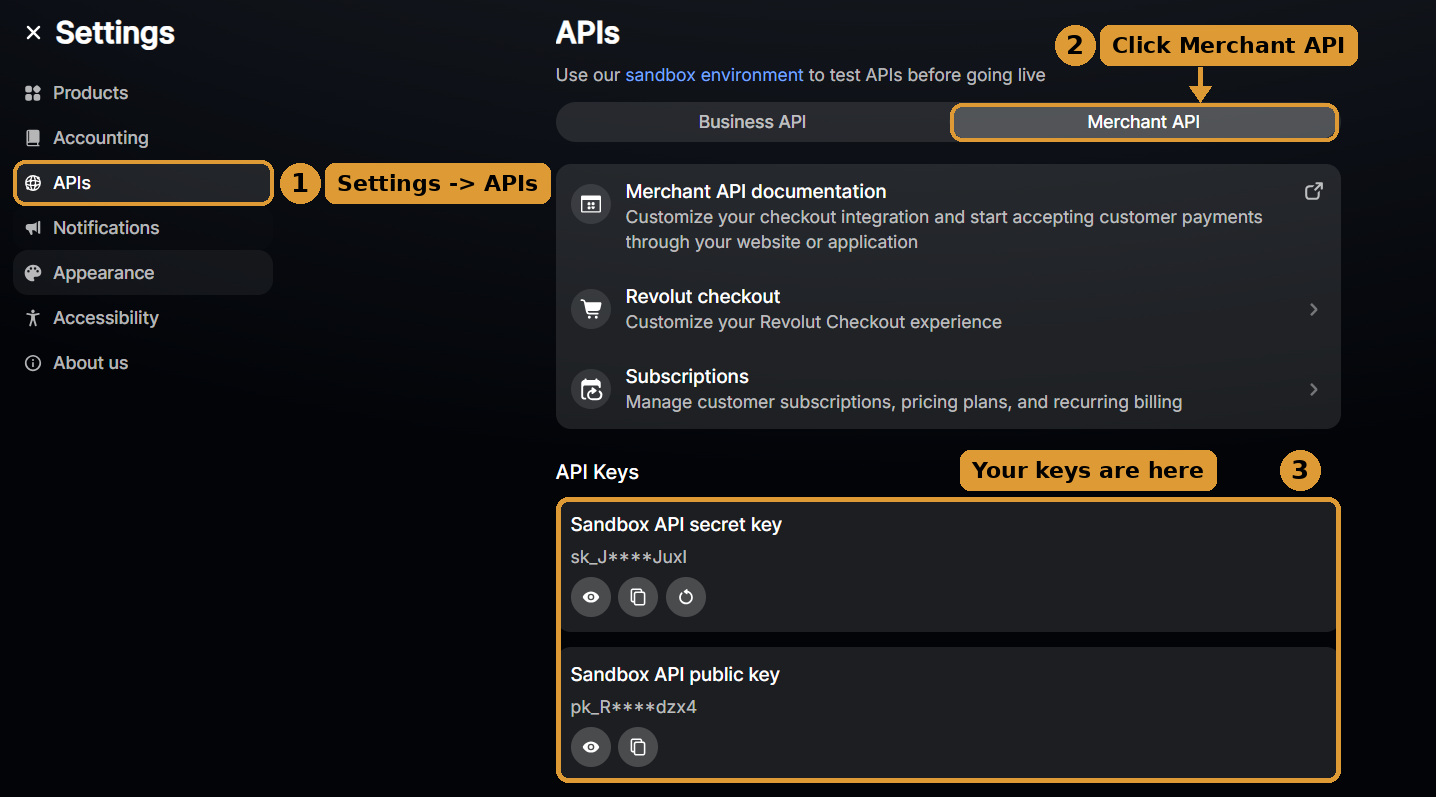
Settings → APIs → Merchant API → API Keys: your secret and public keys The secret key starts with
sk_— Revolut only shows it once, so store it somewhere safe before leaving the page. The public key starts withpk_and is shown beside the secret key. Churn Solution uses these to read your customers, orders, subscriptions and plans, to apply cancellation-flow offers to subscriptions on your behalf, and to register webhooks so subscription changes sync automatically.The public key identifies the Revolut account, so make sure it comes from the same account as the secret key.
Step 2: Add the keys to Churn Solution
Open the Integrations page, select Revolut under Billing Provider Settings and click Connect. In the Connect your Revolut account dialog, paste the secret key and public key, give the connection a name (optional), and click Connect Revolut.
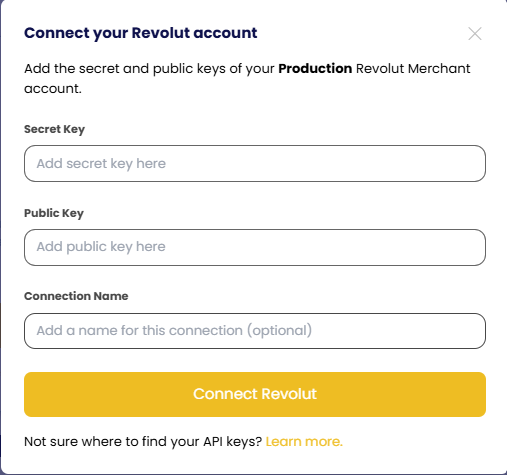
Connect your Revolut account: Secret Key, Public Key and Connection Name After your account is successfully connected, you'll see a label indicating that the connection was successful and your data will begin to be imported into Churn Solution.
- Open the Revolut API Console
- Build the cancellation flow
Open Cancellation Flows in the dashboard. You can create multiple cancellation flows from the UI: build the exit survey, map reasons to offers, set the audience, brand it and publish. The flow is ready to show in your site as soon as the script below is in place. See the Flow builder page for more details.
- Embed the script
Two steps: place the embed code and launch snippet, then (optionally) generate a security token.
Step 1: Place the embed code and launch snippet
Copy the code below and paste it before the closing
</body>tag in your app code. It loads Churn Solution, makes it available in the global JS namespace aswindow.churnSolution, and launches the cancellation flow from your cancel button.<script> !function(){ if (!window.churnSolution || !window.churnSolution.ready) { window.churnSolution = { ready: true }; const s = document.createElement('script'); s.src = 'https://app.churnsolution.com/sdk/index.min.js'; s.async = true; const e = document.getElementsByTagName('script')[0]; e.parentNode.insertBefore(s, e); } }(); </script> <script> document.getElementById('cancel-button').addEventListener('click', (e) => { e.preventDefault(); window.churnSolution?.run({ subscriptionId: 'SUBSCRIPTION_ID', // the customer's Revolut subscription ID appId: 'APP_ID', }); }); </script>You can find your App ID on the Integration page after connecting Revolut. The loader alone can go in
<head>, but the launch snippet must run after the cancel button exists.Step 2: Generate security token Optional
Use the code below to generate a hash on your server, so that every request sent to Churn Solution is secure. Send the hash to the front end and pass it as
authKeyin the launch call. Your secret key is on the Account settings page — keep it on your server, never ship it to the browser.const crypto = require('crypto'); // POST /api/churn-solution — requires a logged-in user app.post('/api/churn-solution', requireAuth, (req, res) => { const subscriptionId = req.user.subscriptionId; // from YOUR session, never the request body const authKey = crypto .createHmac('sha256', process.env.CHURNSOLUTION_SECRET_KEY) .update(subscriptionId) .digest('hex'); res.json({ authKey, subscriptionId }); });// app/api/churn-solution/route.ts import crypto from 'crypto'; import { getSession } from '@/lib/auth'; export async function POST() { const session = await getSession(); if (!session) return new Response('Unauthorized', { status: 401 }); const subscriptionId = session.user.subscriptionId; const authKey = crypto .createHmac('sha256', process.env.CHURNSOLUTION_SECRET_KEY!) .update(subscriptionId) .digest('hex'); return Response.json({ authKey, subscriptionId }); }import hmac, hashlib, os from flask import Flask, jsonify from auth import current_user, login_required app = Flask(__name__) @app.post("/api/churn-solution") @login_required def churn_solution(): subscription_id = current_user().subscription_id auth_key = hmac.new( os.environ["CHURNSOLUTION_SECRET_KEY"].encode(), subscription_id.encode(), hashlib.sha256, ).hexdigest() return jsonify(authKey=auth_key, subscriptionId=subscription_id)<?php // Laravel route: POST /api/churn-solution (auth middleware) Route::post('/api/churn-solution', function () { $subscriptionId = auth()->user()->subscription_id; $authKey = hash_hmac('sha256', $subscriptionId, env('CHURNSOLUTION_SECRET_KEY')); return response()->json(['authKey' => $authKey, 'subscriptionId' => $subscriptionId]); })->middleware('auth');# Rails controller class ChurnSolutionController < ApplicationController before_action :authenticate_user! def create subscription_id = current_user.subscription_id auth_key = OpenSSL::HMAC.hexdigest('SHA256', ENV.fetch('CHURNSOLUTION_SECRET_KEY'), subscription_id) render json: { authKey: auth_key, subscriptionId: subscription_id } end endfunc churnSolutionHandler(w http.ResponseWriter, r *http.Request) { user := mustUser(r) // your auth mac := hmac.New(sha256.New, []byte(os.Getenv("CHURNSOLUTION_SECRET_KEY"))) mac.Write([]byte(user.SubscriptionID)) authKey := hex.EncodeToString(mac.Sum(nil)) json.NewEncoder(w).Encode(map[string]string{ "authKey": authKey, "subscriptionId": user.SubscriptionID, }) }// Spring Boot @PostMapping("/api/churn-solution") public Map<String, String> churnSolution(@AuthenticationPrincipal AppUser user) throws Exception { Mac mac = Mac.getInstance("HmacSHA256"); mac.init(new SecretKeySpec(System.getenv("CHURNSOLUTION_SECRET_KEY").getBytes(UTF_8), "HmacSHA256")); String authKey = HexFormat.of().formatHex(mac.doFinal(user.getSubscriptionId().getBytes(UTF_8))); return Map.of("authKey", authKey, "subscriptionId", user.getSubscriptionId()); }// ASP.NET Core minimal API app.MapPost("/api/churn-solution", (ClaimsPrincipal user) => { var subscriptionId = user.FindFirst("subscription_id")!.Value; var key = Encoding.UTF8.GetBytes(Environment.GetEnvironmentVariable("CHURNSOLUTION_SECRET_KEY")!); using var hmac = new HMACSHA256(key); var authKey = Convert.ToHexString(hmac.ComputeHash(Encoding.UTF8.GetBytes(subscriptionId))).ToLowerInvariant(); return Results.Ok(new { authKey, subscriptionId }); }).RequireAuthorization();Update: launch Churn Solution. Once your endpoint returns an auth key, add
authKeyto the launch call from Step 1, beforesubscriptionId.document.getElementById('cancel-button').addEventListener('click', async (e) => { e.preventDefault(); const { authKey, subscriptionId } = await fetch('/api/churn-solution', { method: 'POST' }).then(r => r.json()); window.churnSolution?.run({ authKey, // from your server subscriptionId, // the customer's Revolut subscription ID appId: 'APP_ID', }); });Click your cancel button to see the flow.
Updating your Revolut keys
If you rotate or regenerate your Merchant API secret key in Revolut, update it in Churn Solution so the connection keeps working: go to Billing Provider Settings → Revolut on the Integrations page, open the existing connection, click Update secret key, paste the new secret key (and the public key, if it changed) and click Update secret key.
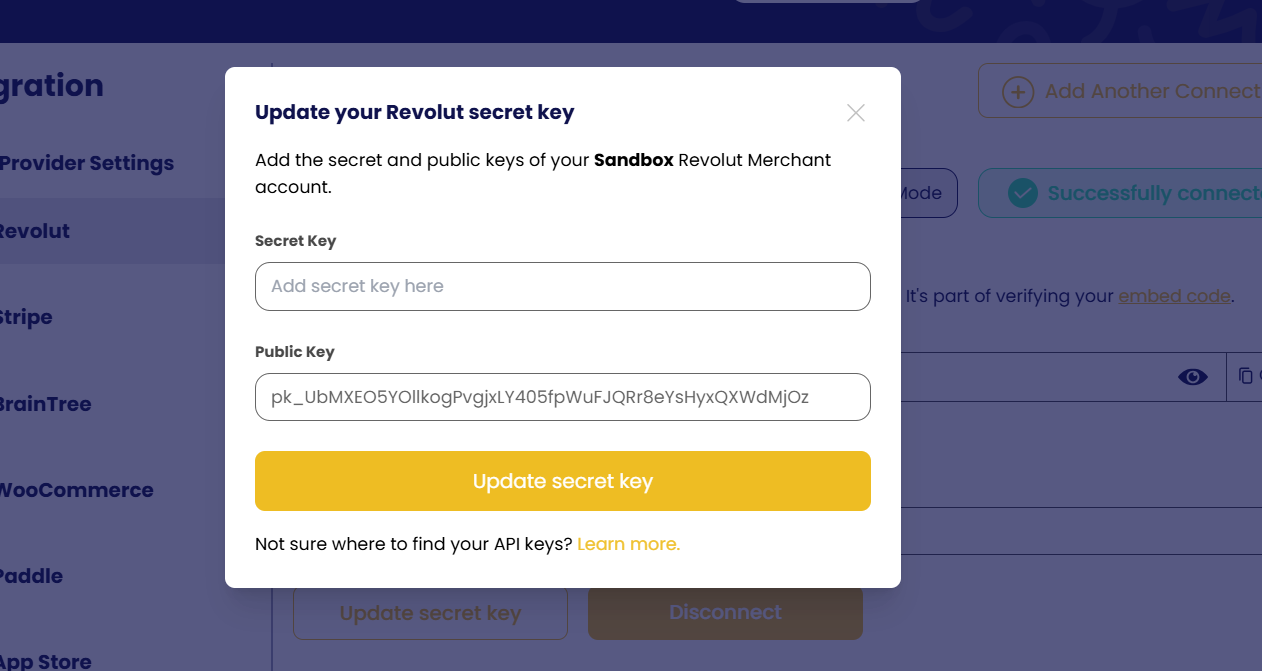
Your imported data and cancellation flows stay in place — only the credentials are replaced. If the keys are left out of date, syncing and offer updates will stop until they're refreshed.
Configuration options
Everything you can configure for Cancellation Flows on Revolut.
Launch options
Everything below goes in the options object of the launch call.
Launch methods on Revolut
run(), renew() and resume() read the shared options: handleAbandon, handleClose, handleDone, record, email, language, font, fontUrl and customTexts.
| Method | What it does | Options it reads |
|---|---|---|
run() |
Opens the cancellation flow | The options in SDK options, apart from the renew() and resume() messages |
renew() |
Reverses a pending cancellation | The shared options and cancellationSettings.uncancel_message |
resume() |
Resumes a paused subscription | The shared options and cancellationSettings.unpause_message |
The direct pause flow and the subscription walls are not supported on Revolut. A pause offer inside a run() flow is a different thing and works.
SDK options
| Option | Description | Example |
|---|---|---|
options.record |
Records the session. On by default. See Session recording | record: false |
options.email |
Email of the customer who started the flow | email: '[email protected]' |
options.font |
Font for the flow, overriding the design page. See Custom fonts | font: 'Roboto' |
options.fontUrl |
Stylesheet URL that loads font |
fontUrl: 'https://fonts.googleapis.com/css2?family=Roboto' |
options.customerAttributes |
Values for the custom attributes your audiences segment on. See Custom attributes | customerAttributes: {
Has_Extended_Free_Trial: true
} |
options.customTexts |
Replaces default texts in the flow. See Custom texts | customTexts: {
'Back': 'Retour'
} |
options.language |
Forces the flow language, taking priority over every other language source | language: 'de' |
options.cancellationSettings |
Overrides the saved cancellation term for this session only. See Set cancellation term | cancellationSettings: {
settings: {
CANCEL_TIME: {
cancellation_time_type: 'IMMEDIATE'
}
}
} |
options.cancellationSettings.settings.CONFIRM_NOT_CANCELLED_ON_ABANDON |
Overrides the saved Show Modal on Abandoned Exit setting for this session only | cancellationSettings: {
settings: {
CONFIRM_NOT_CANCELLED_ON_ABANDON: {
active: false
}
}
} |
options.cancellationSettings.uncancel_message |
renew() only: replaces the success message. Read on the client, never sent to Churn Solution |
cancellationSettings: {
  uncancel_message: 'Welcome back!'
} |
options.cancellationSettings.unpause_message |
resume() only: replaces the success message. Read on the client, never sent to Churn Solution |
cancellationSettings: {
  unpause_message: 'Welcome back!'
} |
options.pauseSettings |
Bounds the custom resume-date picker of a pause offer: subscriptionEndDate is the latest date a customer can pick. The picker starts the day after the current billing period ends |
pauseSettings: {
  subscriptionEndDate: '2027-04-15'
} |
options.handleCancel |
Called when the customer cancels | Takes (customer, cancelFlowInfo) |
options.handleAbandon |
Called when the customer leaves the flow before finishing it | Takes (customer, cancelFlowInfo) |
options.handleDone |
Called when the customer closes the success screen | Takes (customer, cancelFlowInfo) |
options.handleClose |
Called whenever the modal closes, for any reason | Takes (customer, cancelFlowInfo) |
options.handlePause |
Custom pause logic callback | Takes ({ pausePeriod }, customer, cancelFlowInfo) |
options.handleTrialExtension |
Custom trial extension logic callback | Takes ({ trialExtensionDays }, customer, cancelFlowInfo) |
options.handleSwitchPlan |
Custom switch-plan logic callback | Takes ({ plan }, customer, cancelFlowInfo) |
options.autoCancel |
Auto-handle cancellation. On by default | false (to use custom handler) |
options.autoPause |
Auto-handle pausing. On by default | false (to use custom handler) |
options.autoTrialExtension |
Auto-handle trial extensions. On by default | false (to use custom handler) |
options.autoSwitchPlan |
Auto-handle plan switching. On by default | false (to use custom handler) |
A Revolut plan switch is always scheduled for the end of the cycle, with no proration. The SDK adds a fixed English line: "Your new plan starts from your next billing cycle."
On Revolut, extend trial pushes trial_end_date. It is refused on a paid cycle, at 0 days, and beyond Revolut's 182-day trial limit.
Revolut has no native pause. The renewal date is pushed out, and the customer keeps access.
Revolut refuses a pause that ends within about 4 days of a monthly cycle's natural end, but the SDK picker still offers those dates.
Full example
A run() call that sets every option it reads:
document.getElementById('cancel-button').addEventListener('click', function () {
    window.churnSolution?.run({
        authKey, // hash generated by your server
        subscriptionId, // your subscription ID from your payment provider
        appId: 'APP_ID', // your App ID
        options: {
            record: true, // default true, switch to false to turn off recording
            email: '[email protected]', // User email that initiates the cancel flow
            font: 'Roboto',
            fontUrl: 'https://fonts.googleapis.com/css2?family=Roboto:wght@400;500;700&display=swap',
            language: 'de',
            customerAttributes: {
                Has_Extended_Free_Trial: false,
            },
            customTexts: {
                "Back": "Zurück",
                "Next": "Weiter",
            },
            cancellationSettings: {
                settings: {
                    CANCEL_TIME: {
                        cancellation_time_type: 'END_OF_BILLING_PERIOD', // 'IMMEDIATE' | 'END_OF_BILLING_PERIOD'
                    },
                    CONFIRM_NOT_CANCELLED_ON_ABANDON: {
                        active: true, // show the modal when the customer leaves early
                    },
                },
            },
            pauseSettings: {
                subscriptionEndDate: '2027-04-15', // latest resume date the customer can pick
            },
            handleCancel: (customer, cancelFlowInfo) => {
                // cancel callback
            },
            handleAbandon: (customer, cancelFlowInfo) => {
                // abandon callback
            },
            handleDone: (customer, cancelFlowInfo) => {
                // success screen closed callback
            },
            handleClose: (customer, cancelFlowInfo) => {
                // modal closed callback
            },
            handlePause: ({pausePeriod}, customer, cancelFlowInfo) => {
                // pause callback
            },
            handleTrialExtension: ({trialExtensionDays}, customer, cancelFlowInfo) => {
                // trial extension callback
            },
            handleSwitchPlan: ({plan}, customer, cancelFlowInfo) => {
                // switch plan callback
            },
            // Default true. Set any of these to false to make
            // the matching handler responsible for the action
            autoCancel: true,
            autoPause: true,
            autoTrialExtension: true,
            autoSwitchPlan: true,
        },
    });
});
Add custom fonts
By default, Churn Solution uses the font selected on the design page. However, you can override this with any font you prefer for your cancellation flow. To do this, pass two parameters to the sessions API: font and fontUrl.
document.getElementById('cancel-button').addEventListener('click', function () {
    window.churnSolution?.run({
        authKey, // hash generated by your server
        subscriptionId, // your subscription ID from your payment provider
        appId: 'APP_ID', // your App ID
        options: {
            record: true,
            email: '',
            font: 'Roboto', // Font example
            fontUrl: 'https://fonts.googleapis.com/css2?family=Roboto:wght@400;500;700&display=swap', // Font URL example
        },
    });
});
Enable / disable session recording
Session recording is enabled by default. You have the option to disable session recording by setting the record parameter to false in the options of the launch call from the installing section.
window.churnSolution?.run({ authKey, subscriptionId, appId: 'APP_ID', options: { record: false } });Set cancellation term
Learn how Churn Solution manages the cancellation of your customers' subscriptions. By default, each flow follows the option saved on the configuration page.
- Immediate: choose this option for instant subscription cancellation. The customer's subscription is terminated immediately upon cancelling.
- End of billing period: select this option to handle cancellations at the end of the current billing period. Customers keep access until the end of their paid subscription duration.
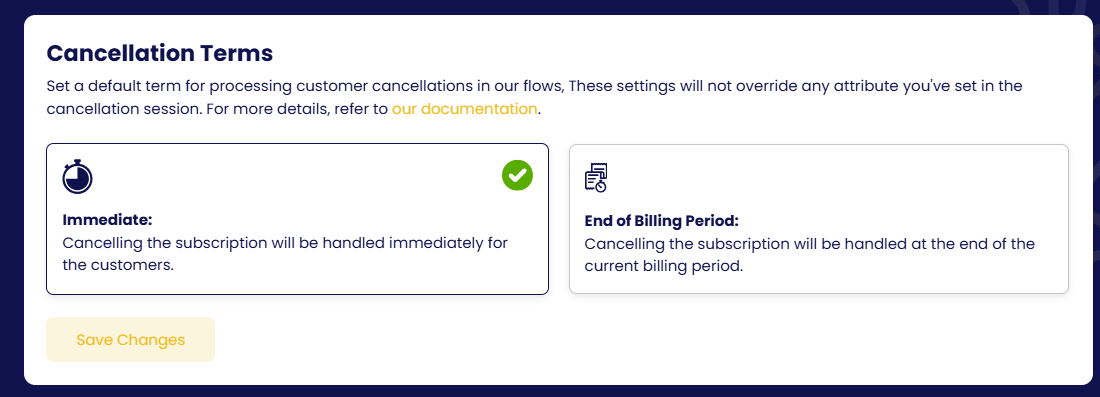
Each flow follows the term saved on the configuration page, but you can override it for a single customer by passing cancellationSettings in the launch call. The override applies to that session only and does not change your saved configuration.
document.getElementById('cancel-button').addEventListener('click', function () {
    window.churnSolution?.run({
        authKey, // hash generated by your server
        subscriptionId, // your subscription ID from your payment provider
        appId: 'APP_ID', // your App ID
        options: {
            cancellationSettings: {
                settings: {
                    CANCEL_TIME: {
                        cancellation_time_type: 'IMMEDIATE',
                    },
                },
            },
        },
    });
});| Term on the configuration page | cancellation_time_type |
Extra field |
|---|---|---|
| Immediate | 'IMMEDIATE' |
— |
| End of billing period | 'END_OF_BILLING_PERIOD' |
— |
Values are case-sensitive. Custom is supported on Stripe only. On Revolut, Churn Solution drops a 'CUSTOM_DATE' override and uses the stored term. End of billing period is not supported on WooCommerce or Recurpay.
Example: cancel trial users immediately and everyone else at the end of the period:
options: {
    cancellationSettings: {
        settings: {
            CANCEL_TIME: {
                cancellation_time_type: isOnTrial ? 'IMMEDIATE' : 'END_OF_BILLING_PERIOD',
            },
        },
    },
},
Custom attributes
When configuring the cancel flow, you can define custom attributes to effectively segment your customers:
- Create the attribute
Within the Configuration Settings tab, or directly from the cancellation flow in the Audience page, create a custom attribute.
- Use it in a flow
Apply flows for the specified segments within your cancel flow. For example, target customers who used a free trial and have already extended it.
- Pass it at launch
When invoking
window.churnSolution.run(), includeHas_Extended_Free_Trialunderoptions.customerAttributes.
document.getElementById('cancel-button').addEventListener('click', function () {
    window.churnSolution?.run({
        authKey, // hash generated by your server
        subscriptionId, // your subscription ID from your payment provider
        appId: 'APP_ID', // your App ID
        options: {
            customerAttributes: {
                Has_Extended_Free_Trial: false // or true, based on user's status
            },
            record: true,
            email: '',
        },
    });
});
Video walkthrough: Custom attributes and segmentation on YouTube.
Customer segmentation based on metadata
Suppose you already have a metadata field, either in the customer metadata or the subscription metadata, and it's set for all your customers.
In the Configuration Settings tab, or directly from the cancellation flow in the Audience page, establish a new custom attribute. Specify the fields used in your metadata and their respective data types. Employ this custom attribute to define segments within your cancel flow, similar to the previous example.
Now, when a customer interacts with the embed, Churn Solution first prioritises the value of the entered key field, if provided during session creation. Then it searches for the relevant data in both their customer and subscription metadata. If found, it uses the value from the subscription metadata first, then from the customer metadata, to evaluate your segment conditions.
Renew, resume & pause
Two more entry points beside run().
Subscription renewal configuration
This feature allows you to win back customers who have cancelled their subscription with a cancellation setting of "at the end of the billing period" (the cancellation has not happened yet). Configure and display a call-to-action (CTA) to let your customers renew their subscription using these settings on the configuration page:
- Immediate renewal: once the user clicks the renew CTA, their cancellation is reverted directly.
- Renew with customer confirmation: set a headline, message and CTA text for the pop-up shown when the user clicks the renew CTA.
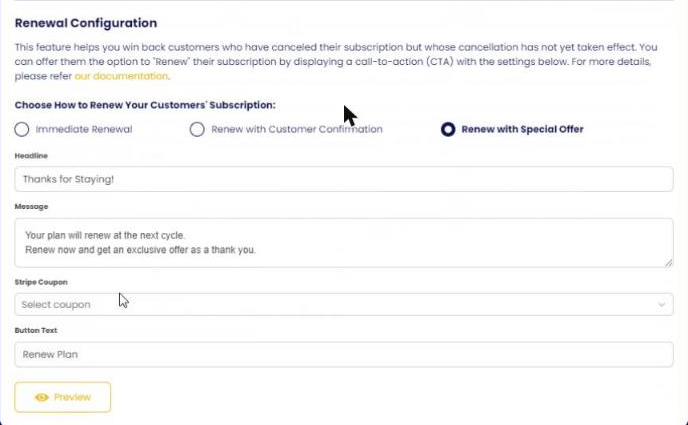
Once you've chosen the configuration, implement the renewal on your site. Typically you attach an event listener to your Renew Plan button. The following code calls a function on the Churn Solution side that handles the renewal:
document.getElementById('renew-button').addEventListener('click', function () {
    window.churnSolution?.renew({
        authKey, // hash generated by your server
        subscriptionId, // your subscription ID from your payment provider
        appId: 'APP_ID', // your App ID
        options: {
            record: true,
            email: '',
        },
    });
});
To replace the success message, pass cancellationSettings.uncancel_message. renew() reads cancellationSettings only for the success message, on the client. Nothing in it is sent to Churn Solution.
Revolut keeps one scheduled action and can't clear it. So renewing schedules a plan change back to the customer's current plan. It only does this over a pending cancel.
Resume configuration
This feature enables you to offer your customers the option to resume their subscription after they have paused payment collection. Configure and display a CTA to let your customers resume using these settings on the configuration page:
- Immediate resume: once the user clicks the resume CTA, their subscription is resumed directly.
- Resume with customer confirmation: set a headline, message and CTA text for the pop-up shown when the user clicks the resume CTA.
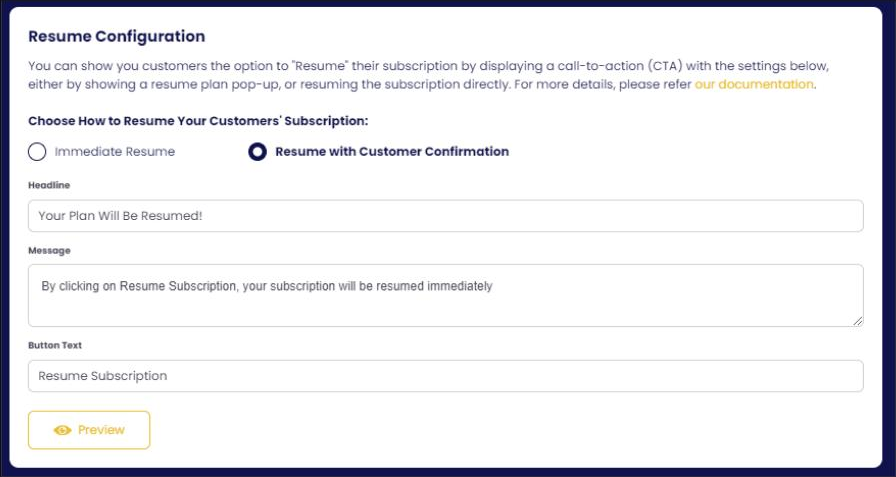
Attach an event listener to your Resume Plan button. The following code calls a function on the Churn Solution side that handles the resume process:
document.getElementById('resume-button').addEventListener('click', function () {
    window.churnSolution?.resume({
        authKey, // hash generated by your server
        subscriptionId, // your subscription ID from your payment provider
        appId: 'APP_ID', // your App ID
        options: {
            record: true,
            email: '',
        },
    });
});
To replace the success message, pass cancellationSettings.unpause_message. resume() reads cancellationSettings only for the success message, on the client. Nothing in it is sent to Churn Solution.
Pause flow
The pause flow is not supported on Revolut. A pause offer inside a run() flow still works.
Callbacks & custom logic
Run your own billing code when a customer accepts an offer or cancels, instead of letting Churn Solution act in your gateway.
The model
Every action has a pair: a handleX callback and an autoX flag.
autoX: true (default)
Churn Solution performs the action in your gateway. Your handleX, if defined, is called afterwards as a notification.
autoX: false
Churn Solution does nothing in the gateway. Your handleX must perform the action and resolve or reject.
A handler on its own never stops Churn Solution. Always set the matching autoX: false when you take over.
The handlers object
This object contains the action handlers with a flag for each action to specify whether the handler is a replacement for the Churn Solution handler or extra functionality. If any of the auto props is true, its action is handled from the Churn Solution side, and your callback for that event is also called when the action executes. You can also send the email of the customer who started the cancellation flow.
{
    record: true, // default true, switch to false to turn off recording
    email: '', // User email that initiates the cancel flow
    handleCancel: (customer, cancelFlowInfo) => {
        // cancel callback
    },
    handleAbandon: (customer, cancelFlowInfo) => {
        // abandon callback
    },
    handleDone: (customer, cancelFlowInfo) => {
        // success screen closed callback
    },
    handleClose: (customer, cancelFlowInfo) => {
        // modal closed callback
    },
    handlePause: ({pausePeriod}, customer, cancelFlowInfo) => {
        // pause callback
    },
    handleTrialExtension: ({trialExtensionDays}, customer, cancelFlowInfo) => {
        // trial extension callback
    },
    handleSwitchPlan: ({plan}, customer, cancelFlowInfo) => {
        // switch plan callback
    },
    // If any of the below props is true
    // its action will be handled from Churn Solution side
    autoCancel: false,
    autoPause: false,
    autoSwitchPlan: false,
    autoTrialExtension: false,
}
Signatures
Offer handlers are called as handler(offer, customer, cancelFlowInfo), where offer carries offerType plus the fields below. handleCancel and the lifecycle callbacks receive (customer, cancelFlowInfo).
| Handler | offer fields |
|---|---|
handlePause |
pausePeriod (months) |
handleTrialExtension |
trialExtensionDays |
handleSwitchPlan |
plan |
Return a Promise. resolve({ title, message }) replaces the success-screen text; reject({ message }) shows an error and keeps the subscription unchanged.
Example: custom cancel and pause
window.churnSolution?.run({
  authKey, subscriptionId, appId: 'APP_ID',
  options: {
    handleCancel: (customer, flowInfo) => new Promise(async (resolve, reject) => {
      try {
        await fetch('/api/billing/cancel', { method: 'POST', body: JSON.stringify({ subscriptionId }) });
        resolve({ message: 'Your account has been cancelled. You will not be billed again.' });
      } catch (e) {
        reject({ message: 'We could not cancel your account. Please contact support.' });
      }
    }),
    handlePause: ({ pausePeriod }, customer, flowInfo) => new Promise(async (resolve, reject) => {
      try {
        await fetch('/api/billing/pause', { method: 'POST', body: JSON.stringify({ subscriptionId, months: pausePeriod }) });
        resolve({ message: `Paused for ${pausePeriod} month${pausePeriod === 1 ? '' : 's'}. You will not be billed until you resume.` });
      } catch (e) {
        reject({ message: 'We could not pause your account. Please contact support.' });
      }
    }),
    autoCancel: false,
    autoPause: false,
  },
});
Lifecycle callbacks
| Callback | Fires when |
|---|---|
handleAbandon |
The customer leaves the flow before finishing |
handleDone |
The customer closes the success screen |
handleClose |
The modal closes for any reason |
Texts & languages
Override any default string in the cancellation, resume or renewal flows, or force a language.
Force a language
options: { language: 'de' }Custom texts
Pass customTexts as a map of original text → replacement. Only the keys you include change.
window.churnSolution?.run({
  authKey, subscriptionId, appId: 'APP_ID',
  options: {
    customTexts: {
      'Back': 'Retour',
      'Next': 'Suivant',
      'Decline Offer': "Refuser l'offre",
      'Accept Offer': "Accepter l'offre",
      'Done': 'Terminé',
      'Pause Subscription': "Mettre l'abonnement en pause",
      'Cancel Subscription': "Annuler l'abonnement",
      'Extend Free Trial': "Prolonger l'essai gratuit",
      'Claim your offer': 'Réclamez votre offre',
      'Switch Plan': 'Changer de forfait',
      'No, Back': 'Non, retour',
      'Yes, Leave': 'Oui, quitter',
      'Chat on WhatsApp': 'Discuter sur WhatsApp',
      'Send an Email': 'Envoyer un e-mail',
    },
  },
});
All overridable keys
Show the full list (90+ strings)
"Back", "Next", "Decline Offer", "Done", "Cancel", "Cancel Subscription", "Close", "Yes, Leave", "No, Back",
"Powered by", "Cancellation Guaranteed by", "Offer Guaranteed by",
"You are already paused", "You won't be billed until your subscription resumes",
"Subscription Cancelled.", "Subscription Uncancelled.", "Subscription Resumed.", "Subscription paused.", "Subscription Activated.",
"You can enjoy all our features again!", "Something went wrong!", "Please refresh your page and try again",
"Offer applied", "Successfully claimed offer", "Switch Plan", "Successfully switched plan",
"Successfully switched plan with a discount.", "Extend Free Trial", "Successfully extended your free trial",
"Unable to Recover Payment", "Unable to Switch Plan", "Please contact customer support for assistance",
"Submit the form to proceed with your cancellation", "Go To Form", "Write your answer...", "Answer...", "empty option",
"Minimum number of characters:", "Day", "Days", "day", "days", "week", "weeks", "month", "months", "year", "years",
"billing cycle", "billing cycles", "Choose offer type", "Pause Subscription", "Accept", "Accept Offer", "Claim your offer",
"Switch and Claim Your Offer", "Discover a Better Plan for You", "Claim Your Offer & Switch Plan", "Extend Trial By",
"Chat on WhatsApp", "Send an Email", "Choose how long you want to pause", "Loading...", "Waiting Submit...",
"Limited time offer for", "Enjoy This Discounted Price Forever", "Your subscription is successfully restored",
"Your subscription is successfully resumed", "You won't be billed again.",
"Your subscription is canceled and will end at the end of your current billing period.",
"Your subscription is canceled and will end after", "Your subscription is canceled and will end", "Today", "Can't Cancel",
"Success", "Your action has been successfully done", "Cancellation Incomplete",
"You've started the cancellation process but haven't finished it. Are you sure you want to leave?",
"Oops! something went wrong!", "It seems you have already claimed this coupon", "Offer Already Redeemed",
"Off your next renewal", "Off all of your next renewals", "Off for"
Custom fonts
By default the flow uses the font chosen on the Design page. Override it per session:
options: {
  font: 'Roboto',
  fontUrl: 'https://fonts.googleapis.com/css2?family=Roboto:wght@400;500;700&display=swap',
}
Google Form confirmation
Ask customers to fill a Google Form before (or after) they confirm a cancellation. Optional or required.
Enable the form
- Make the form public
Anyone with the link must be able to answer.
- Turn it on in the confirmation step
In the flow's cancellation confirmation settings, enable the Google Form button, set its text and the form URL.
- Optional: require submission
Enable "require Google Form submission" to block cancellation until the form is submitted. This needs the validation setup below.
Required-submission setup
- Add a "Cancellation Bin Code" field
A Short answer question titled exactly
Cancellation Bin Code. It is pre-filled with a unique value at runtime. Important: inform customers not to edit this field, as the unique value is essential for form validation.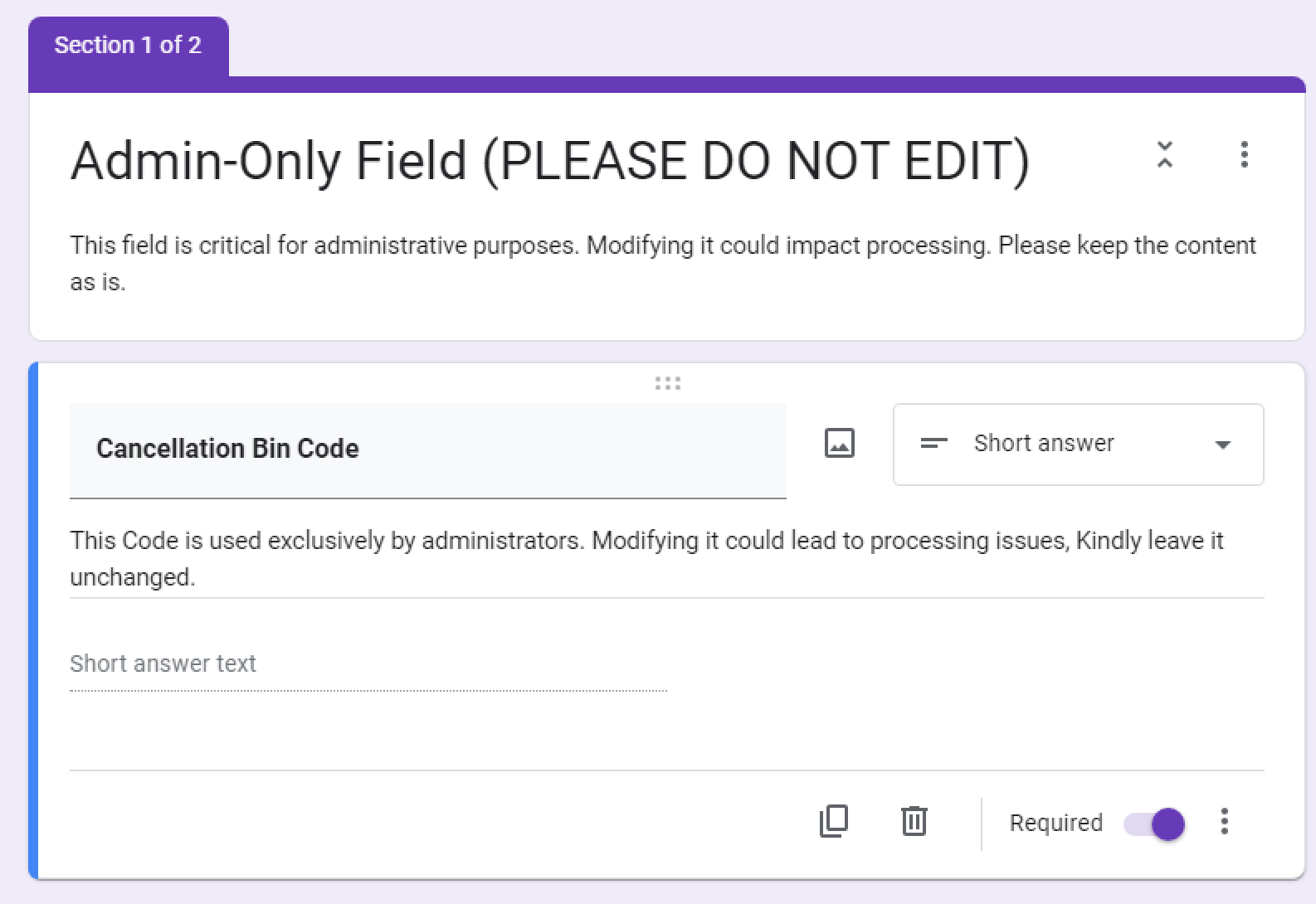
The Cancellation Bin Code field in the Google Form. - Open the Script editor
In the Google Form builder, click the three dots in the upper right corner and select Script editor. Paste the script below and save.
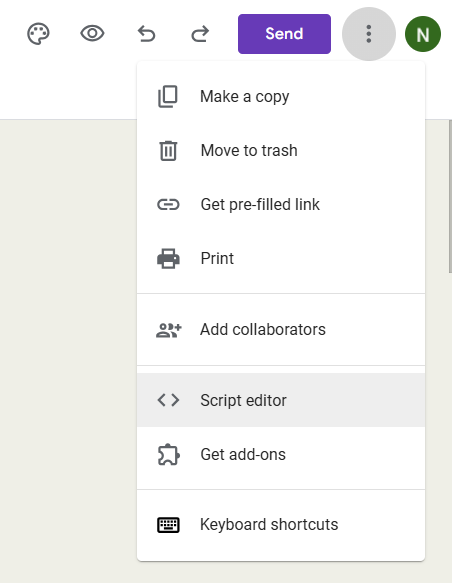
Opening the Script editor from the form menu. 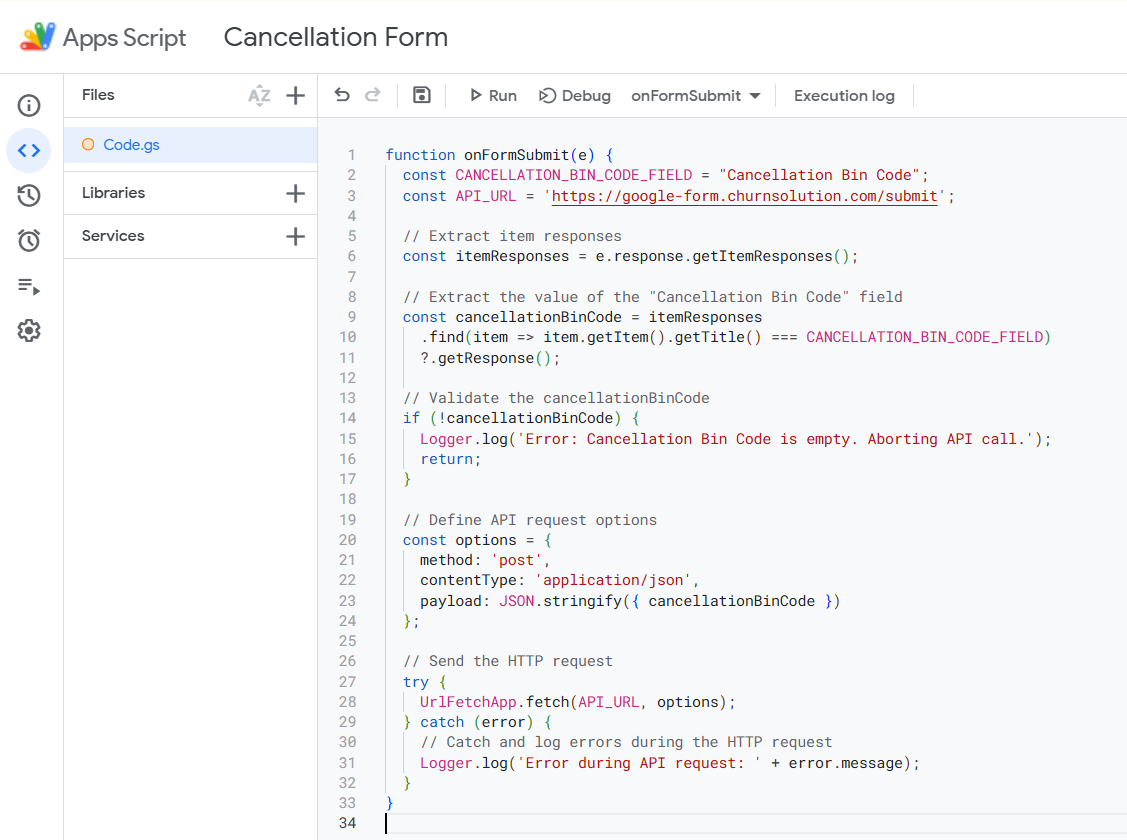
The script pasted into the Script editor. - Add a trigger
From the same page, click Triggers → Add trigger and match these settings: function
onFormSubmit, event source From form, event type On form submit. Save the trigger so it appears on the triggers page.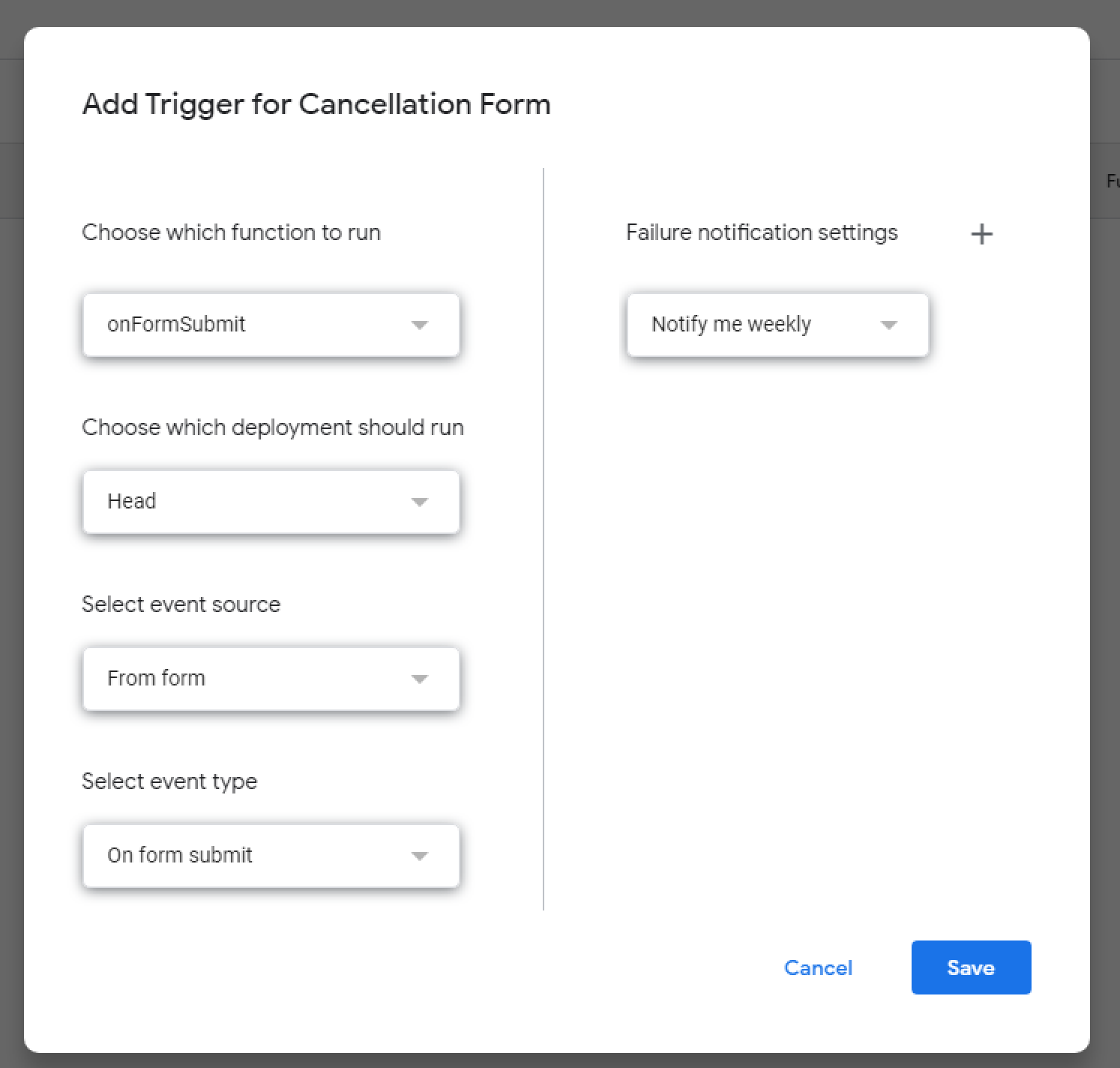
Trigger settings. 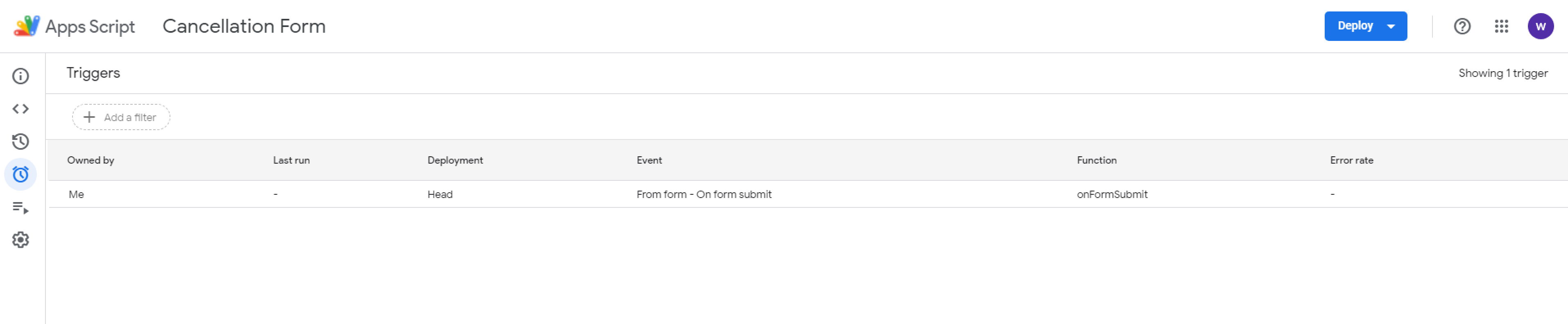
The saved trigger on the triggers page. - Set the confirmation message
In the form settings go to Settings → Presentation → After submission → Confirmation message and tell customers not to close the form, for example: "Your response has been recorded! Please keep this form open until we process your cancellation. We'll close it automatically when done. Thank you!"
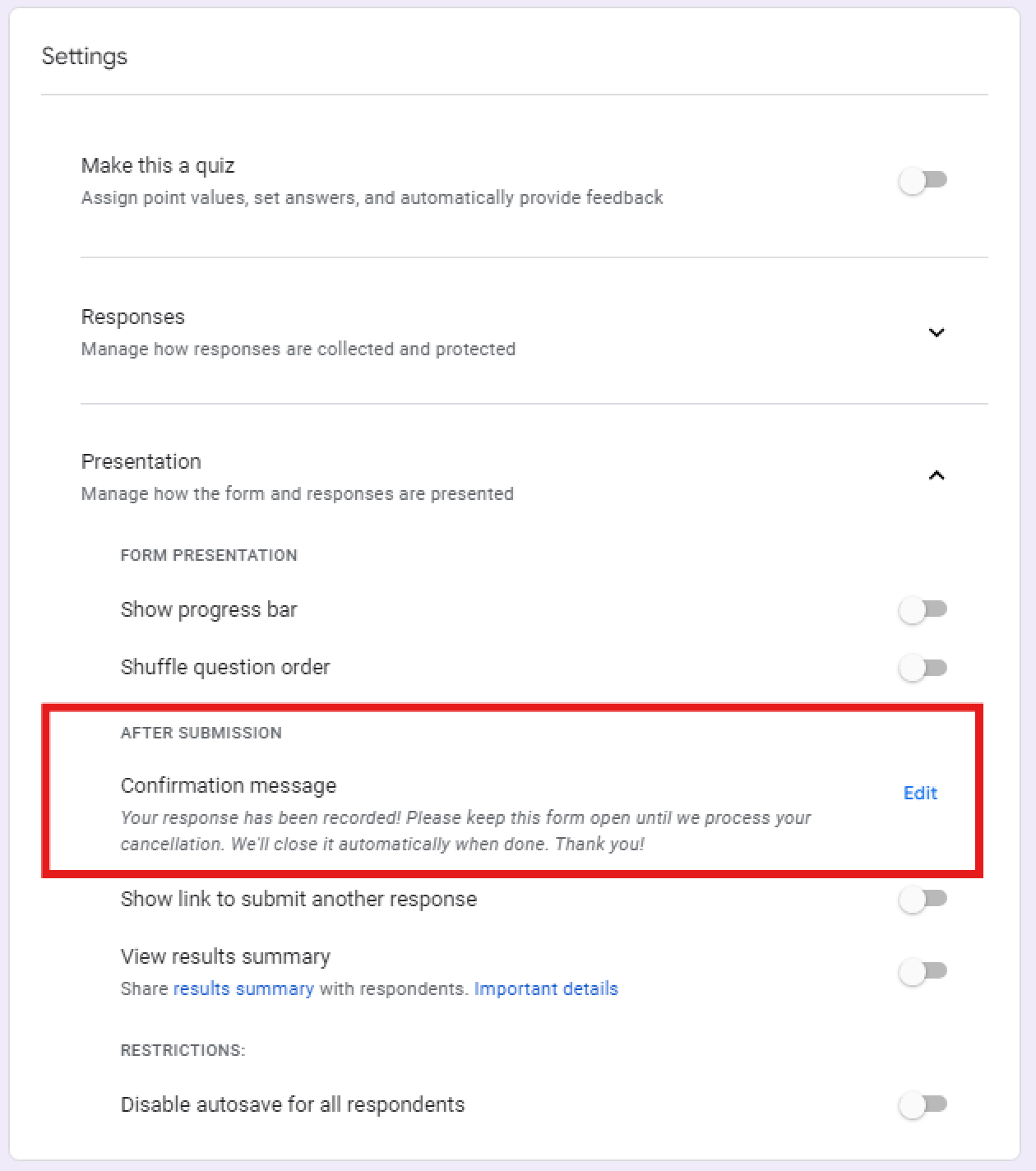
The confirmation message setting.
function onFormSubmit(e) {
  const CANCELLATION_BIN_CODE_FIELD = "Cancellation Bin Code";
  const API_URL = 'https://google-form.churnsolution.com/submit';

  const itemResponses = e.response.getItemResponses();
  const cancellationBinCode = itemResponses
    .find(item => item.getItem().getTitle() === CANCELLATION_BIN_CODE_FIELD)
    ?.getResponse();

  if (!cancellationBinCode) {
    Logger.log('Error: Cancellation Bin Code is empty. Aborting API call.');
    return;
  }
  try {
    UrlFetchApp.fetch(API_URL, {
      method: 'post',
      contentType: 'application/json',
      payload: JSON.stringify({ cancellationBinCode }),
    });
  } catch (error) {
    Logger.log('Error during API request: ' + error.message);
  }
}
Offers available on Revolut
- ✓ Pause subscription
- – Apply discount
- ✓ Switch plan
- – Switch plan with offer
- ✓ Extend free trial
- ✓ Contact support (email / WhatsApp)
- ✓ Send to a page
How Revolut is used with Churn Solution
Updating customer subscriptions
When a customer goes through your cancellation flow and accepts an offer, Churn Solution manages the billing updates for you. The offer types available on Revolut are: pause subscription, extend free trial, switch plan, contact support, and send to page.
You can also segment your customers with custom attributes by passing them through the session API for each customer.
Audience segmentation
Churn Solution imports Customers, Orders, Subscriptions and Subscription Plans from Revolut to build audiences. Available attributes:
Payment Recovery on Revolut Not available
Payment Recovery is not available on Revolut yet. If you need it for your Revolut subscriptions, contact the team.
Contact the teamReactivation Campaigns on Revolut Not available
Reactivation Campaigns are not available on Revolut yet. If you need them for your Revolut subscriptions, contact the team.
Contact the team